
Free AI Music Prompt Generator
Chat Your Vibe, Get Perfect Suno Tags
Stop guessing Suno syntax. Turn your creative vision, mood, or favorite artist references into pro-level AI music prompts and structure tags.
The Free Suno Tag & Prompt Generator Built for Creators
Tired of generic AI music renders? The secret to professional-grade tracks isn’t a different model—it’s using structured Suno metatags.
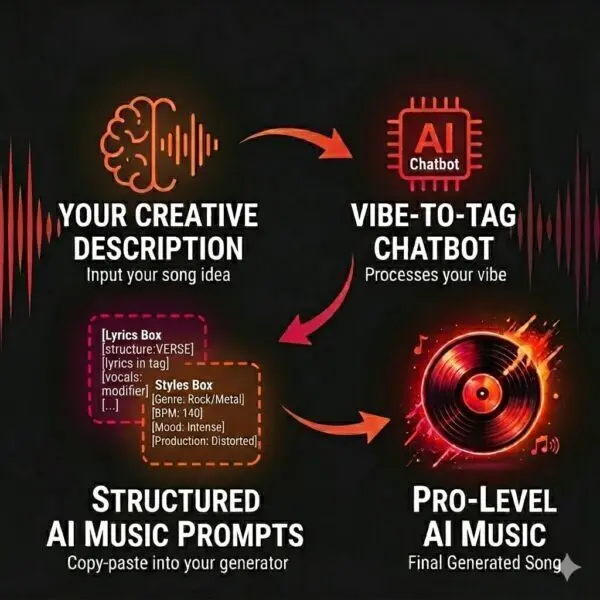
Vibe-to-Tag acts as a dedicated Suno prompt generator. It translates plain language, emotional descriptions, or artist vibes into the exact two-zone prompt syntax Suno understands: clean style tags for the Styles Box and structural commands for the Lyrics Box.
Copyright-Safe Suno Artist Style Translator
Want a track inspired by a specific band without triggering Suno copyright filters? Simply describe the artist or song. Our generator translates protected names into safe, non-flagged style descriptors and genre tags that pass safety filters every time.
(If your prompt is currently locked, check out our guide on how to bypass Suno copyright blocks.)
How to Use Vibe-to-Tag
1
Tell Your Story
Describe a late-night memory, a mood you’re chasing, or even an artist and song title. The more details you provide, the better V2T can lock in your sound.
The Example: “A humid summer night in New Orleans with distant brass, a sense of longing, and soulful, marching band energy of Beyoncé’s Homecoming.”
But honestly, you can talk on and on if you need to.
2
Get Your Tags
Vibe-to-Tag whips up Lyrics and Style Boxes perfect for Suno. It’s 100% safe, royalty-free, and ready to play. No errors—just great sound.
The Win: You get a custom-made set of tags that perfectly captures the mood you’re after. No more guessing. No more errors. Just pure vibe.
Hello! That saves both time and credits. Thank us later.
3
Copy & Paste
Drop those tags into Suno, insert your lyrics, tweak what you like, and slap the “Create” button. It’s that simple—no music degree required.
The Payoff: Sit back and hear the difference as the AI finally nails the assignment, turning your raw ideas into a professional-grade track that actually sounds like your vibe.
Go make some noise. We’ll be here when you’re ready for the next hit.
How Vibe-to-Tag Works
AI models are powerful, but they need guidance. When you provide vague prompts, the AI is forced to guess your production style. Vibe-to-Tag eliminates the guesswork. By feeding Suno categorized, high-fidelity production data, you gain surgical control over the final mix, the instrumentation, and the overall mood of every generation.
Understanding Suno Syntax
Syntax is the difference between a professional render and wasted credits.
Because Suno processes each input box differently, your tagging strategy must adapt to where you’re placing the code.
The Square Bracket Rule
- Lyrics Box: Commands require [Brackets]. Without them, the AI will attempt to sing your instructions as lyrics.
- Styles Box: Commands must be bracket-free. Adding brackets here can cause the model to ignore your genre or glitch the generation entirely.
Copy, Paste & Personalize
Click the Copy button on the Pink Box to grab the structural tags; paste these into the Suno Lyrics Box, substitute your lyrics, and the rest of your song prompt. Then, click the Copy button on the Orange Box and paste it into the Suno Styles Box, substituting your comma-separated Genre, BPM, etc.
Master the details in our Simple Suno Syntax Guide.

Frequently Asked
Yes, and it helps you get the most out of your limited free credits. By using high-precision tags, you reduce the need for “rerolling” (re-generating) your songs to get the right sound. You get closer to your ideal result on the first or second try, making your daily credits go much further.
Absolutely. Our structural tags are designed to sit right alongside your lyrics in the Suno Lyrics Box. They act as “stage directions” for the AI, telling it exactly how to perform your words—whether you want a hushed whisper in a Verse or an explosive belt in the Chorus.
While Vibe-to-Tag is optimized specifically for Suno’s syntax and processing architecture, the underlying musical concepts—tempo, mood, and instrumentation—are universal. You can use the generated Style tags as a solid foundation for other AI music platforms, though you may need to adjust the structural brackets based on the specific requirements of the other tools.
Beyond the Vibe
Ready for More?
Join the sound revolution. Mastering the prompt is just the first step. Vibe-to-Tag is built by audio engineers dedicated to pushing the boundaries of AI-assisted composition. If you’re looking for deeper insights on production, mix engineering, or advanced AI workflows, explore our professional sound engineering tools to take your sound from generated to produced.
Already mastering your sound? Register to join our community of AI music creators to share your tracks, trade prompt tips, and see what the latest generation is capable of.